

Over the past month I have sat down with 12 different home services companies. Different trades, different sizes, different platforms. Almost every one of them is running good software badly. The CRM schedules the call, dispatches the tech, captures the signature, and sends the invoice. All of that works. Then I ask what they made on last month’s jobs, and the answer does not come from CRM job costing. It comes out of a spreadsheet somebody updates on Sunday nights.
That is not a software problem. The system can answer the question. However, the company set it up as a scheduling and invoicing tool, and nobody ever built the CRM job costing workflow that would put cost on the job.
What CRM Job Costing Is Supposed To Do
What CRM Job Costing Is Supposed To Do
A field service CRM is not a calendar. It is a job cost system that happens to also schedule work. Every job in it should collect five things:
- Revenue. What you invoiced, which is the part that almost always works
- Material. What you purchased or pulled from stock for that specific job
- Labor. Hours on that job, at a burdened rate, including the drive time and the return trip
- Equipment. The truck, the fuel, the tools, allocated on a defined basis
- Lead source. Where the call came from, captured at the front and carried all the way through
When all five land on the job, gross margin by job and by channel comes out of the system on its own. When any one is missing, however, it does not.
Material is usually the one that breaks first. Lead source, on the other hand, is the one that stays broken longest without anyone noticing.
Where The Workflow Breaks
Where The Workflow Breaks
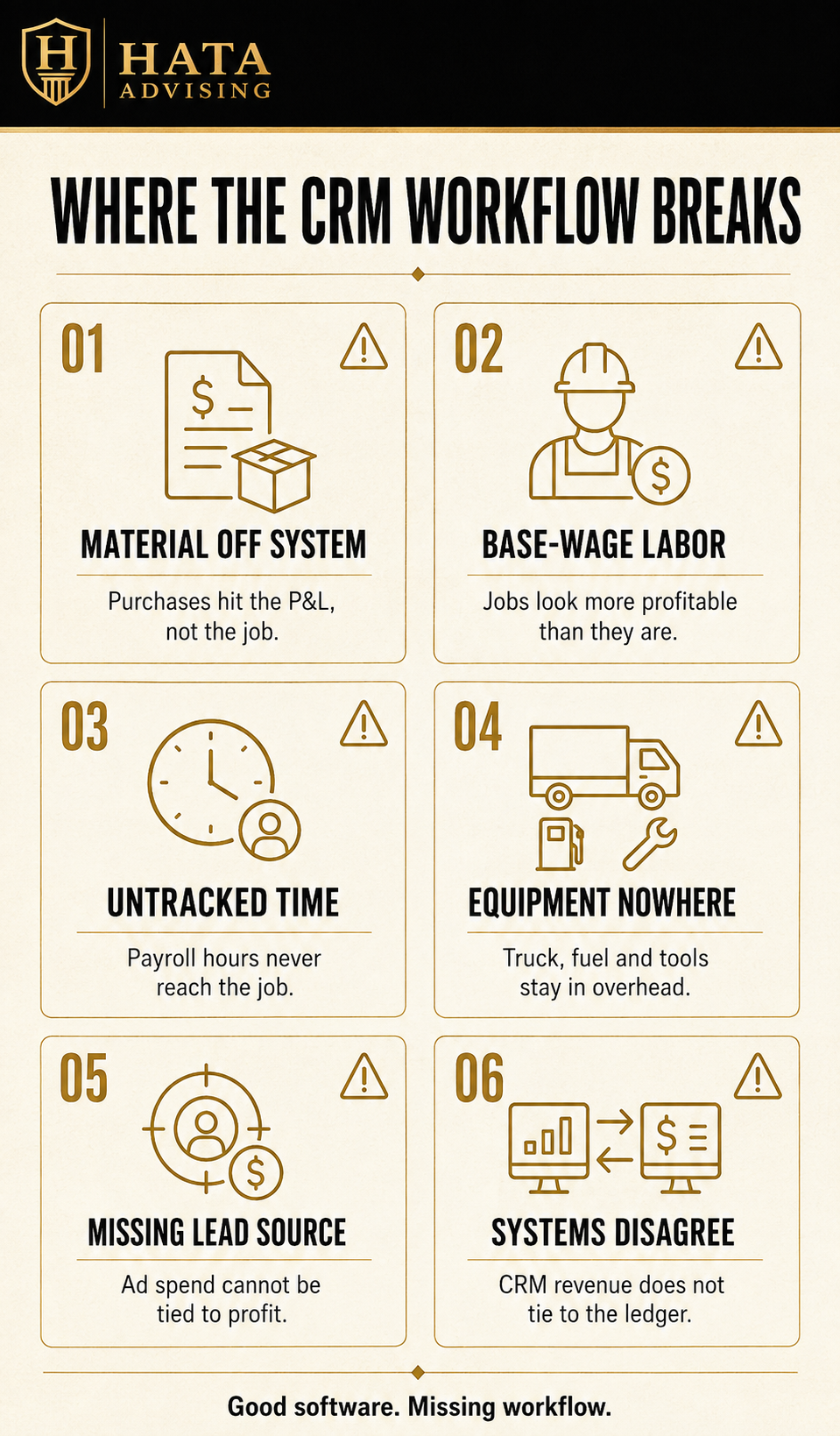
Material bought off the system. A tech stops at the supply house, pays with a company card, and the receipt goes to accounting. Accounting codes it to a material account in QuickBooks. The dollars are in the P&L, but nobody captured the job number, so the cost never lands on the job. The fix is simple: issue purchase orders from the CRM against a job, and receive them when the material arrives. That single change moves more cost onto jobs than anything else you can do.
Labor at base wage. A tech billed at $45 an hour costs you far more than $45. Payroll taxes, workers comp, insurance, PTO, training, and unbilled drive time all belong in the rate. The Bureau of Labor Statistics tracks how much benefits and payroll taxes add on top of wages every quarter, and it is never a small number. Most systems let you set a burdened cost per tech. Yet many companies leave the base wage in the field, and every job looks more profitable than it is.
Time not tied to jobs. Clock in and clock out is payroll data, not job data. If nobody assigns the hours to job numbers, you cannot cost labor at all, and the largest cost in the business is invisible at the job level.
Equipment nowhere. Truck payments, fuel, maintenance, and tools sit in overhead and never touch a job. On equipment-heavy work, this is a real distortion. You do not need it perfect, you need a defined allocation applied the same way every month.
Where Source And Revenue Fall Apart
Where Source And Revenue Fall Apart
Lead source never captured. The call comes in and the CSR books it. However, the CSR leaves the source field blank or picks whatever sits at the top of a dropdown nobody has cleaned up in three years. As a result, every dollar you spend on Google Ads, Facebook, Instagram, and TikTok flows into a job record that cannot say where it came from.
Two systems that disagree. The CRM says one revenue number and the general ledger says another. Once that gap exists, nobody trusts either one, and somebody builds a spreadsheet to reconcile them.
The Spreadsheet Is A Symptom, Not A Solution
The Spreadsheet Is A Symptom, Not A Solution
Every company we see with a spreadsheet standing in for CRM job costing built it for a good reason. The system was not producing the number, somebody needed the number, so they made one.
The problem is what the spreadsheet becomes. First, it is manual, so it lags. One person maintains it, so it leaves when they do. It also does not agree with the financials, so now you have two answers and no way to tell which is right. And because it is a workaround, nobody ever goes back and fixes the workflow that made it necessary.
In other words, the spreadsheet is not the system of record. It is evidence that nobody is using the system of record.
Tag The Call Or The Ad Spend Is A Guess
Tag The Call Or The Ad Spend Is A Guess
CRM job costing tells you which work makes money. Lead source tagging tells you where that work came from. You need both, and the second one is usually in worse shape than the first.
For example, most companies can tell you what they spent last month by channel. Google Ads, Facebook, Instagram, TikTok, the yard signs, the truck wraps, the repeat and referral calls. However, almost none can tell you what came back. That is not a marketing problem either. It is the same workflow gap, at the front of the job instead of the back.
Three things have to be true:
- Every channel gets its own tracking number. If Google Ads and Facebook point at the same phone number, the attribution argument is over before it starts. Separate numbers, plus form and web tracking, is the mechanical part
- The source field is required and the list is short. A dropdown with forty options is a dropdown nobody uses correctly. Ten clean sources that a CSR can pick in one second beats a comprehensive list that gets ignored
- The source rides all the way to the completed job. Booked is not the finish line. The source has to survive through the sold job and the completed job with cost on it
Measure Profit, Not Leads
Measure Profit, Not Leads
That last one is where the real answer lives. Your agency reports leads and cost per lead. Those are their numbers. Yours are cost per booked job, cost per completed job, and gross profit by source.
The difference matters more than owners expect. For example, one channel produces a high volume of cheap leads that book small service calls at thin margin. Another produces a third as many leads that turn into installs. On a cost per lead report, the first channel wins. On a gross profit report, however, it may be losing you money every month. Revenue by source is not enough either, because different channels bring different job types. You need margin.
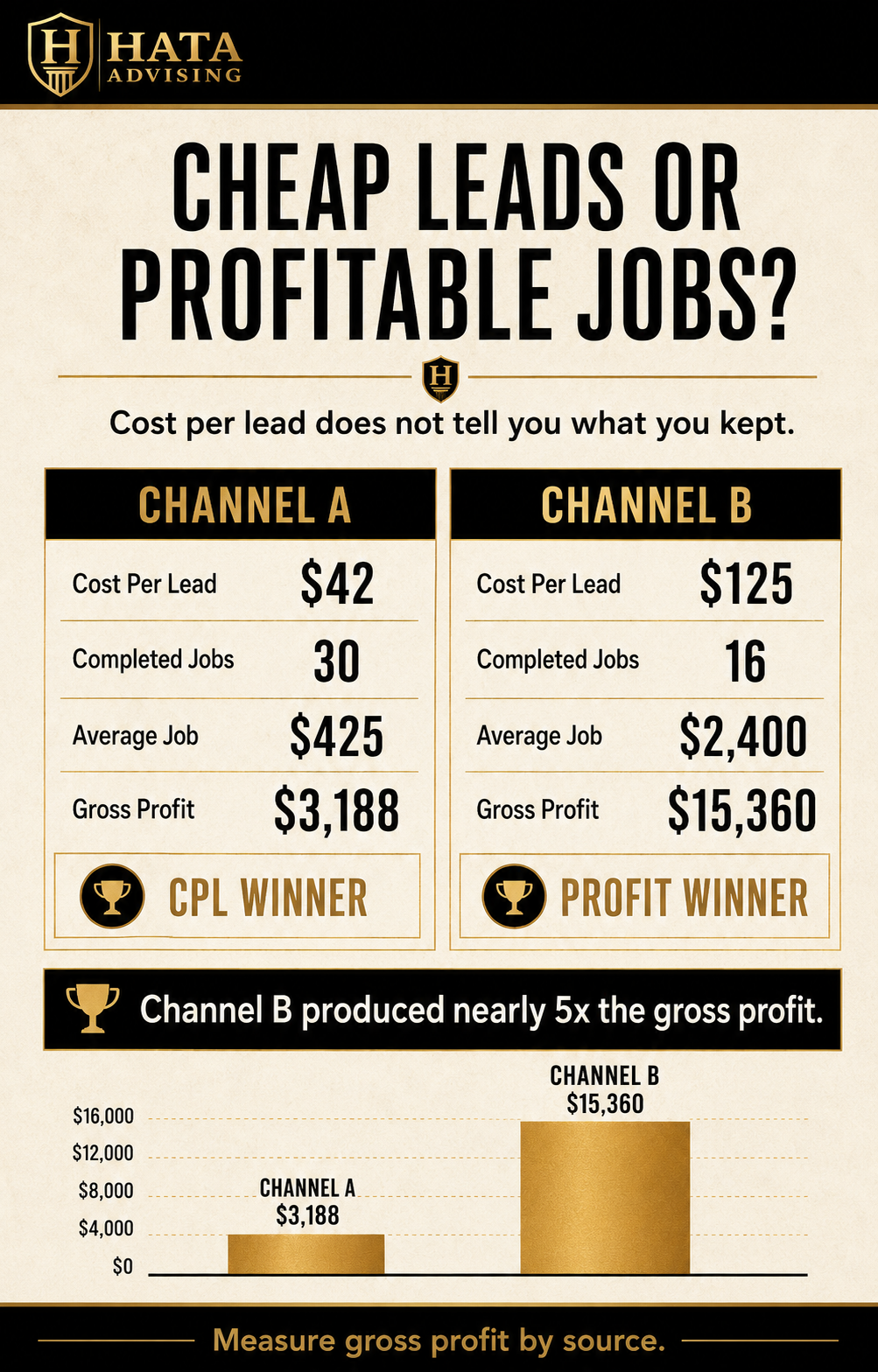
When lead source and job cost are both working, one report answers the question every owner is actually asking: what did we spend by channel, what did it produce, and what did we keep.
What It Costs You
What It Costs You
Pricing on guesses. If you do not know what a job type actually costs, your price book is a guess with a markup on top. Raise prices across the board and you have no way to tell whether it worked.
No visibility by job type, crew, or channel. The whole point of job costing is finding out that install is carrying service, or that one crew runs eight points below another, or that a channel is producing revenue that loses money. None of that is visible without cost on the job.
Marketing budget set by feel. Without gross profit by source, you scale the channel that feels busy and cut the one that feels quiet. As a result, companies end up spending more every year on the channel that produces the least profitable work.
Change orders and callbacks disappear. Rework has a cost. If nobody attaches it to the original job, you cannot see which work is generating it.
Financing and diligence friction. A lender reading your balance sheet or a buyer running a quality of earnings review will ask for revenue and margin by service line. If your answer is a spreadsheet that does not tie to the financials, you have handed them a reason to discount you.
What Healthy CRM Job Costing Looks Like
What Healthy CRM Job Costing Looks Like
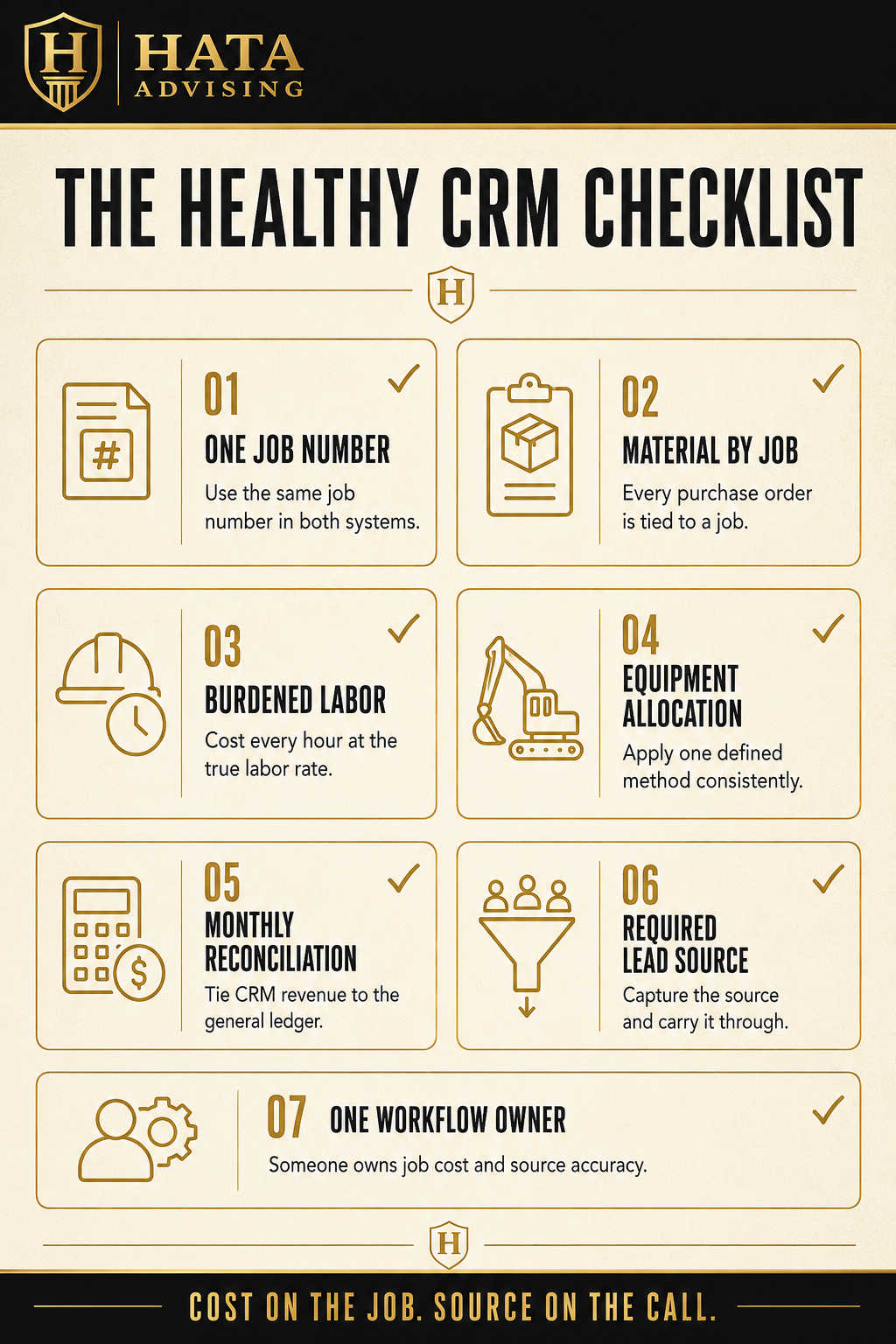
You do not need a new platform. You need seven things true:
- Every job has a number that exists in both systems. The CRM and the accounting file agree on what a job is
- Material moves through purchase orders tied to a job. No job number, no purchase
- Labor carries a burdened rate, not base wage, and every hour lands on a job
- Equipment gets a defined allocation that you apply the same way every month
- The CRM and the general ledger reconcile monthly. CRM revenue for the month ties to revenue in the P&L. If it does not tie, find out why before you use either number
- Every call gets a lead source from a short, required list, with a tracking number per channel, and it follows the job through to completion
- One person owns the workflow. Not the software, the workflow. Someone whose job it is to make sure jobs are being costed and sourced correctly
What This Looked Like In Practice
What This Looked Like In Practice
A home services company had a well-known field service platform, fully paid for and two years into use. Scheduling and invoicing ran well. Job costing lived in a spreadsheet that an office manager kept by pulling material totals from credit card statements and estimating labor from the schedule.
The platform itself did not need replacing. Instead, we built a purchase order workflow so the team bought material against a job, set burdened labor rates for each tech, defined an equipment allocation, cut the lead source list down and made it required with a tracking number per channel, and reconciled CRM revenue to the general ledger monthly.
What came out: install margin and service margin were nowhere near what the owner assumed, the company had priced one recurring job type below cost since the last price book update, and the paid channel with the lowest cost per lead was producing the least gross profit of any source in the business. We retired the spreadsheet. The numbers now come out of the system nobody was fully using.
The Bottom Line
The Bottom Line
In short, most owners do not have a software problem. They have a workflow problem sitting inside good software. Material, labor, equipment, and lead source have to land on the job, or the CRM stays a scheduling tool, the ad spend stays a guess, and the real financial answers stay in a spreadsheet nobody can defend.
Fix the workflow, and CRM job costing finally delivers the reporting they promised you at the demo.