

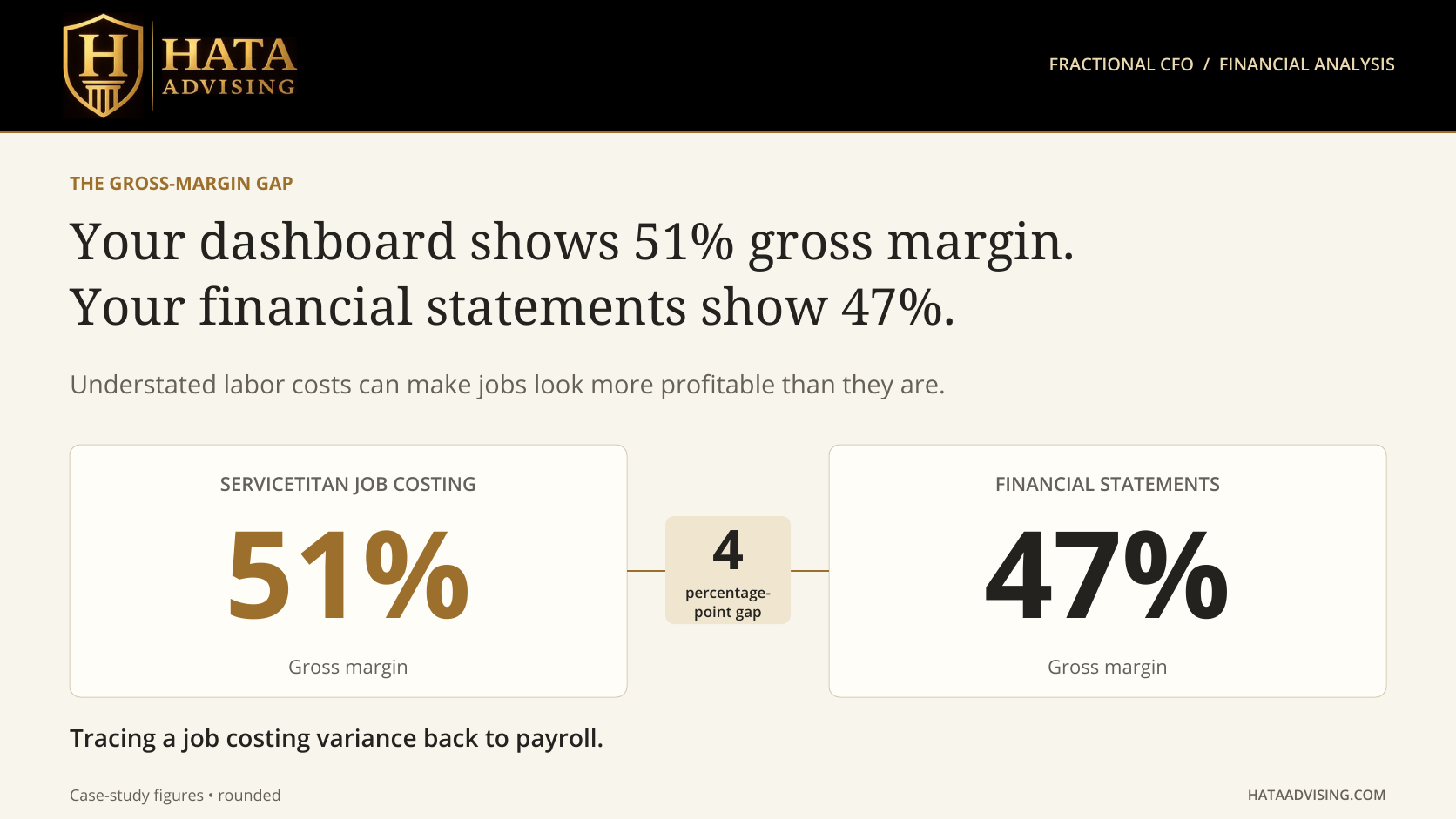
ServiceTitan showed 51 percent gross margin. The financial statements showed 47 percent.
That four-percentage-point gap was the starting point. The labor analysis uncovered a larger issue: for one quarter, about $820,000 of labor had reached job costing against approximately $1,350,000 of loaded payroll for the same technicians.
Management needed to understand what the dashboard was measuring before using it to make pricing, hiring, or compensation decisions.
We traced the labor shortfall, presented the supporting documentation and reconciliation workbook to the executive team, and implemented the labor-rate and payroll adjustments. This case study walks through the discrepancy, the troubleshooting, and the corrections put in place.
What the initial analysis showed
- Reported gross margin was 51 percent in ServiceTitan and 47 percent on the financial statements.
- Labor assigned to jobs represented about 61 percent of the loaded payroll in the quarter reviewed.
- The labor reconciliation identified approximately $425,000 of burden underallocation and $105,000 of paid time outside jobs.
- Recorded burden rates averaged about $11 per hour, roughly 46 percent of base pay.
- The documentation and reconciliation workbook were presented to the executive team, and the labor-rate and payroll adjustments were implemented.
These findings identified a labor-allocation problem that we addressed through the implemented adjustments. The labor bridge and the gross-margin comparison measure different things: the $530,000 labor shortfall does not, by itself, reconcile the four-percentage-point margin gap.
Start with a comparable set of numbers
Before tracing a variance, establish what each report includes.
Use the same period and business units. Compare the revenue populations, job and invoice status, payroll accruals, and treatment of materials, subcontractors, labor, and overhead. A cost included in operational job costing may sit outside cost of sales in the general ledger. Revenue and costs may also reach the two reports at different times.
Once those differences are identified, the reconciliation should show which amounts agree, which differences are explained, and which remain open.
That is the financial planning and analysis work: connecting the operating reports to the financial statements, then deciding what the differences mean.
A four point gap can conceal a larger labor problem
The ServiceTitan margin was consistently higher in the periods reviewed, and the spread was widening. That pattern warranted a closer look at shared rates and processes, while keeping timing and classification differences in the analysis.
The headline margin gap is a net number. Differences in revenue, materials, and labor can offset one another.
In this case, the initial analysis put the labor shortfall at approximately ten points of revenue. Comparing that figure with the four-point margin spread requires the same revenue base, period, and cost scope, along with any offsetting differences.
The bridge below accounts for the $530,000 difference between labor assigned to jobs and loaded payroll in the quarter reviewed. It is a labor reconciliation, not a complete numerical reconciliation of the four-point gross-margin gap.
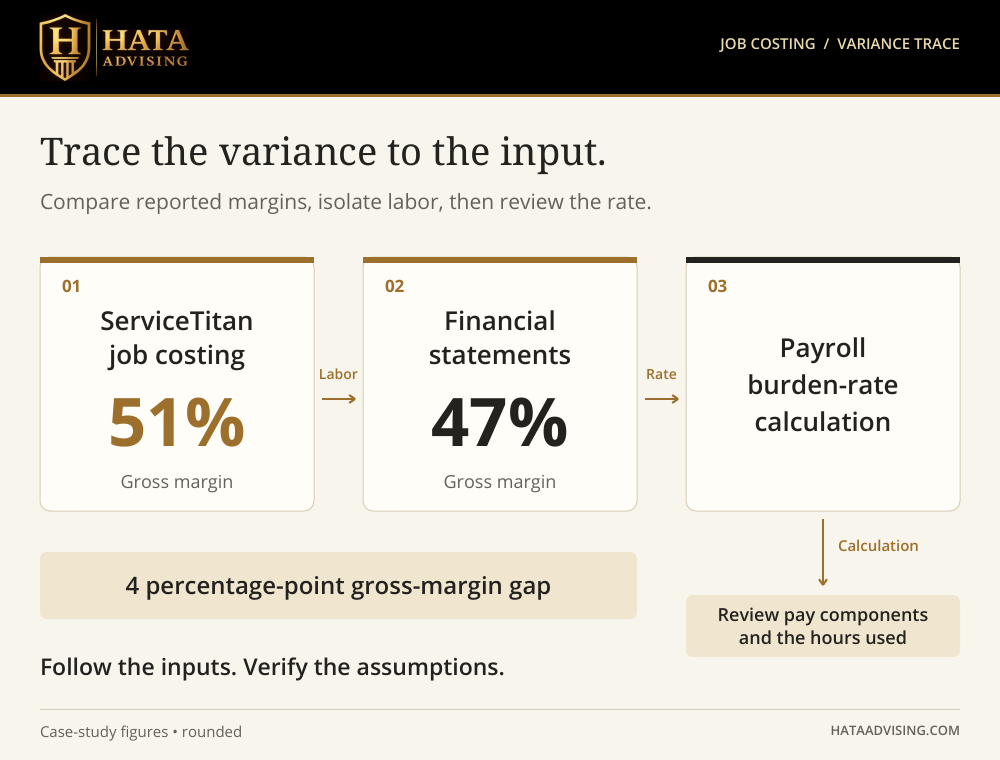
Follow labor from the job to payroll
We compared labor assigned to jobs with the general ledger and payroll for the same technicians. For the quarter reviewed, the rounded amounts were:
- Labor costed to jobs in ServiceTitan: $820,000
- Burden underallocation identified in the reconciliation: $425,000
- Paid time outside jobs: $105,000
- Loaded payroll: $1,350,000
The bridge adds up to $1,350,000. ServiceTitan carried about 61 percent of that amount, leaving $530,000 outside the labor cost assigned to jobs.
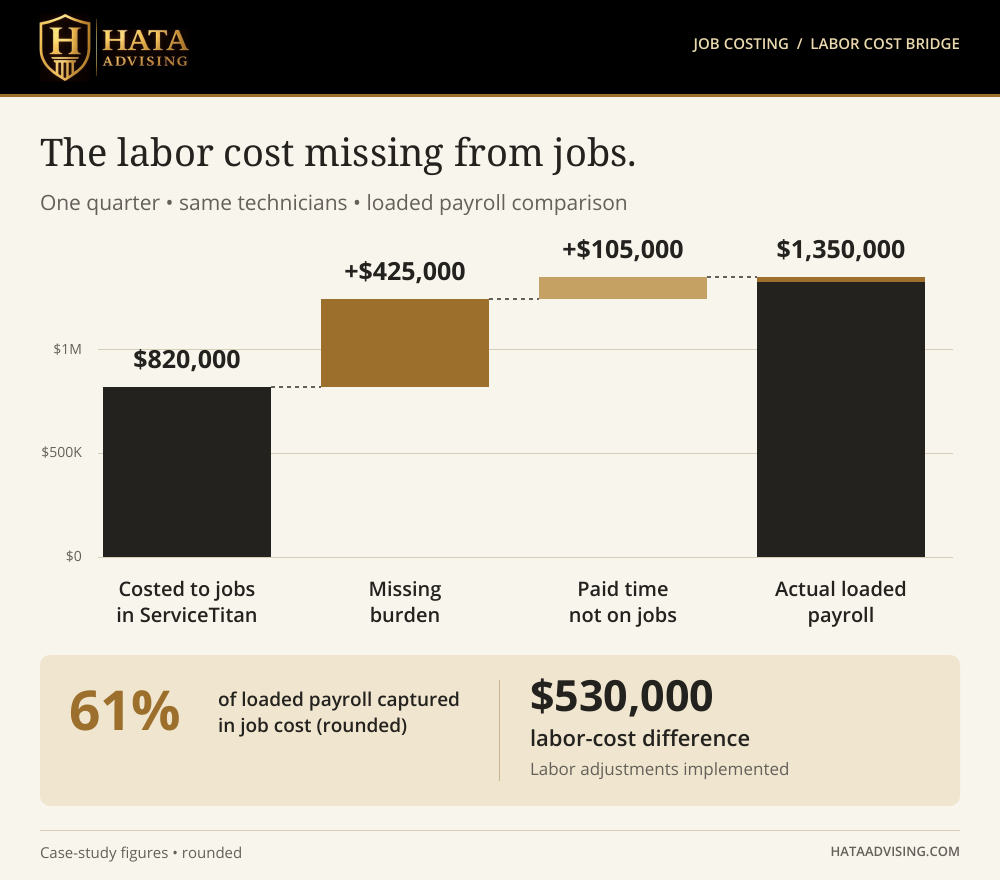
This is a comparison of where existing cost was recorded. It does not represent a new payroll expense or $530,000 of savings.
The next cuts were by department and role. The initial analysis showed labor understatements across all four departments, ranging from approximately $76,000 to $146,000 for the quarter. More than 90 percent of the identified burden shortfall related to lead technicians and commission-paid technicians.
That distribution directed attention toward the shared costing setup and the treatment of variable compensation. It did not rule out missing time, job-level errors, or other reporting differences.
Check the technician record and the account configuration
ServiceTitan's technician burden-rate guidance makes an important distinction: what belongs in burden depends on how the account handles payroll costs.
Where labor pay and performance pay are already included separately, those costs should not also be included in burden. The burden field is under Settings, People, Technicians, in the technician's Revenue & Cost section. Hourly pay is managed in the technician's payroll settings.
The records we reviewed averaged about $11 per hour in burden. Our troubleshooting focused on the underlying cost components and the hours receiving that rate.
Nine technician records had no hourly rate. We considered those records in the context of each technician's pay structure and account setup; a blank hourly rate alone does not establish an error for a commission-only employee.
Incentive compensation was material, running about 45 percent on top of field wages. Tracing that compensation through payroll and job costing was part of identifying what the labor allocation included.
ServiceTitan documents separate Labor Pay and Performance Pay sections. Performance pay requires configuration and appears after invoices are posted. Checking those details comes before changing the burden calculation.
Document the cost basis and the hour basis
For any payroll-fed rate, obtain the calculation in writing. The questions are practical:
- Which earnings codes, employer taxes, benefits, and other costs are included?
- Which costs already reach job costing through another route?
- What period does the rate cover?
- Which hours form the denominator?
- Which hours receive the rate in job costing?
- Which employees are eligible for the feed, and when do updates take effect?
If a cost is spread over all paid hours but the rate is applied to a smaller set of job hours, some cost may remain unallocated. The reconciliation must show which hours are excluded and how their cost is handled.
A trailing average also needs to be tested against recent raises, compensation changes, seasonality, and changes in the mix of hours. A rate can update frequently while still reflecting older pay periods.
The reconciliation documented the labor shortfall and supported the adjustments implemented with management. The findings do not establish a software defect or a vendor-specific cause.
For a rate intended to allocate the remaining eligible cost, subtract amounts already captured elsewhere in job costing before dividing by the hours that will receive the rate. Keep the cost categories, period, and hour basis consistent. Document any costs intentionally left outside the allocation.
Why a plausible burden percentage is not enough
A burden rate equal to 46 percent of base pay may not look unusual at first.
The Bureau of Labor Statistics reported that in June 2026, private-industry employers paid an average of $14.07 in benefits per hour worked alongside $32.82 in wages and salaries. Benefits were approximately 43 percent of wages, or 30 percent of the $46.89 total compensation cost.
That is a broad reference point, not a company-specific costing rate.
The BLS wage measure includes commissions and production bonuses. Its benefit measure includes paid leave and nonproduction bonuses, among other costs. It is also measured per hour worked, rather than only the hours assigned to jobs. Those definitions matter when comparing the benchmark with a technician's base hourly rate.
A reasonable-looking percentage still needs to reconcile to the company's compensation structure, costs, and allocation method.
Present the findings and implement the adjustments
We met with the executive team and presented the documentation and reconciliation workbook. The review connected the reported discrepancy to the labor-cost findings and the adjustments needed in the labor-rate and payroll process.
The adjustments were then implemented, putting the labor-costing corrections in place.
For similar corrections, the controls are practical:
- Confirm the configuration. Document the payroll formula, included earnings and costs, look-back period, employee eligibility, and the labor costs ServiceTitan already captures.
- Complete the rate calculation. Use a representative period and technician-level hours. Account for seasonality and known compensation changes. ServiceTitan's published guidance uses a full year's costs as a starting point; a shorter period needs a clear reason.
- Test changes before rollout. Compare representative jobs and technicians before and after a rate update. Check hourly, commission, and mixed-pay arrangements.
- Control the payroll feed. If the integration writes the rate field, agree with the provider and system owner how updates will be managed. Change the feed only after its behavior and the replacement process are verified and approved.
- Establish an effective date. Confirm how rate changes affect current and historical reports. ServiceTitan supports historic burden-rate tracking, and posted/exported invoice behavior can limit later changes.
- Review management measures. Explain the expected reporting effect and review affected scorecards, targets, and compensation arrangements. Any changes need management approval and a clear effective date.
- Reconcile as part of the close. Compare labor assigned to jobs with loaded payroll, then review the broader margin reconciliation. Record and explain any differences.
Implementation establishes the change. Recurring reconciliation keeps the calculation tied to payroll and shows the reporting effect over time.
Keep the reconciliation on the close calendar
Assign one person to own the calculation and its review.
Monthly, compare ServiceTitan margin with the financial statements by business unit, using a defined scope and an agreed tolerance. Explain differences above that tolerance.
Quarterly, compare labor assigned to jobs with loaded payroll and assess whether the rates still fit the cost and hour basis. Review sooner when pay plans, benefits, staffing, or operating patterns change.
Keep the formula, source reports, effective dates, approvals, and unresolved items with the reconciliation. This gives the next reviewer a repeatable process.
The bottom line
The four-point margin gap gave us a reason to investigate. The labor reconciliation showed that approximately $530,000 of loaded payroll had not reached the labor cost assigned to jobs in the quarter reviewed.
We traced that shortfall to burden underallocation and paid time outside jobs, presented the documentation and reconciliation workbook to the executive team, and implemented the labor-rate and payroll adjustments. The discrepancy led to a documented correction. Recurring reconciliation helps keep labor costs aligned over time.
For an owner, the practical question is simple: can someone show how the margin in the operating dashboard reconciles to the financial statements and how identified issues were corrected?
Hata Advising provides fractional CFO and FP&A support for home services companies, including job-costing reconciliation, labor-rate analysis, and monthly variance reporting. Our systems and CRM integration work connects those operating workflows to the books.
If your ServiceTitan margins do not reconcile to your financials, request a free consultation or call 801.631.5123.